Be careful of conclude too fast!
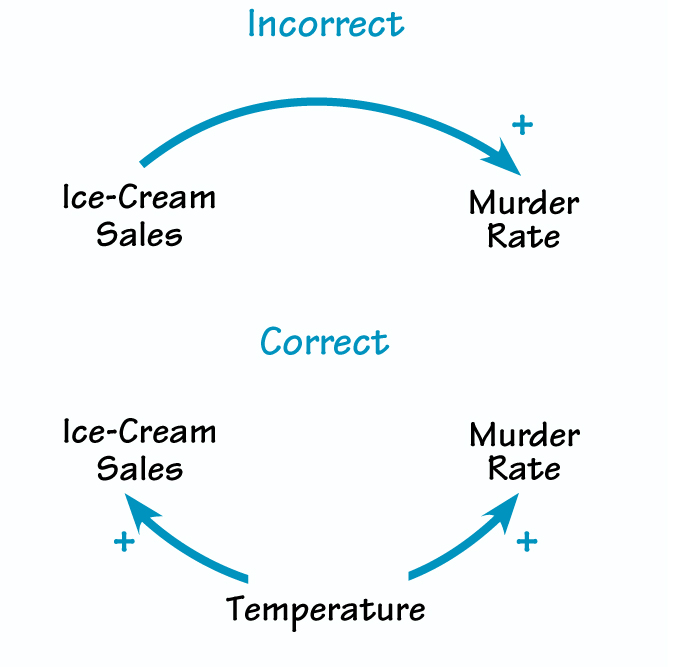
References:
- https://towardsdatascience.com/why-correlation-does-not-imply-causation-5b99790df07e
Be careful of conclude too fast!
References:
- https://towardsdatascience.com/why-correlation-does-not-imply-causation-5b99790df07e
function getShadowElements(element) {
  const shadowElements = [];
  let subElements = element.querySelectorAll("*");
  for (let i = 0; i < subElements.length; i++) {
    let subElement = subElements[i];
    if (subElement && subElement.shadowRoot) {
      shadowElements.push(subElement);
    }
  }
  return shadowElements;
}
function convertShadowElements() {
  const shadowElements = getShadowElements(document);
  for (let i = 0; i < shadowElements.length; i++) {
    let shadowElement = shadowElements[i];
    const tag = shadowElement.tagName;
    let css = shadowElement.shadowRoot.innerHTML;
    css = css.replaceAll(':host', `.${tag}`);
    css = css.replaceAll(':root', `.${tag}`);
    const html = shadowElement.innerHTML;
    shadowElement.outerHTML = `${css}${html}`
  }
  // to execute many time with children customelements
  // if (getShadowElements(document).length > 0) {
  //   convertShadowElements();
  // };
}
convertShadowElements();
In the newer versions of gnome-pomodoro, you can see an icon with progress bar like that:

But probably you are missing the countdown timer like:

For this, just type in a terminal:
$ gsettings set org.gnome.pomodoro.plugins.gnome indicator-type text
$ gsettings set org.gnome.pomodoro.plugins.gnome indicator-type short-text
$ gsettings set org.gnome.pomodoro.plugins.gnome indicator-type icon
References:
- https://github.com/gnome-pomodoro/gnome-pomodoro/issues/262
Hi everyone!
Today I'm gonna write my solution to pomodoro timer in gnome shell.
On my last update to Pop!_OS 20.04 LTS, I've found an error in my gnome plugin gnome pomodoro http://gnomepomodoro.org This error is with gnome-shell 3.38 with some change that they do in this new version https://github.com/gnome-pomodoro/gnome-pomodoro/issues/520
My solution was delete the entire plugin and compile and install a new version:
sudo apt purge gnome-shell-pomodoro gnome-shell-pomodoro-data
sudo apt-get install libtool-bin # It is really necesary?
sudo apt-get install autoconf-archive gettext valac pkg-config desktop-file-utils appstream-util libappstream-glib-dev libglib2.0-dev gsettings-desktop-schemas-dev gobject-introspection libgirepository1.0-dev libsqlite3-dev libgom-1.0-dev libgstreamer1.0-dev libgtk-3-dev libcanberra-dev libpeas-dev libappindicator3-dev
git clone -b 0.19.0 https://github.com/codito/gnome-pomodoro.git
cd gnome-pomodoro
./autogen.sh --prefix=/usr --datadir=/usr/share
make
sudo make install
Then restart gnome-shell with alt+f2 and write "r" and intro key. Thanks a lot, And good luck!
References:
- https://github.com/gnome-pomodoro/gnome-pomodoro/issues/492
- https://github.com/gnome-pomodoro/gnome-pomodoro/issues/572
Estadística es el "lenguaje de la ciencia para la toma de decisiones racionales" Zurita (2008)
Es una ciencia "exacta". Pero de interpretación subjetiva al que interpreta los datos.
VLOOKUP has many problems searching, one of them is thatsn't allow to search fields in left of searching column.
=INDEX(columnToGetValue, MATCH("Value", columnToSearchValue, 0), 1)
- columnToGetValue: column where do you need to get the value (parallel to search column)
- "Value": value to look for
- columnToSearchValue: column where do you need to search the value
- 0: constant for exercise
- 1: You can change the 1 with many positions to the right column to get value.
Example in Excel (with ; instead of ,):
=INDEX(Sheet1!$C$1:$C$200; MATCH($F3; Sheet1!$A$1:$A$200; 0); 1)
References:
- https://trumpexcel.com/vlookup-vs-index-match/
- https://exceljet.net/index-and-match
Como pensamos que se debe medir el éxito vs una mejor forma de medirlo.

Referencias:
https://www.linkedin.com/feed/update/urn:li:activity:6767493239177011200/


